Web2App · Published 2025-07-14 · 1 min read
Destination Mismatch in Google Ads: why the warning arrives
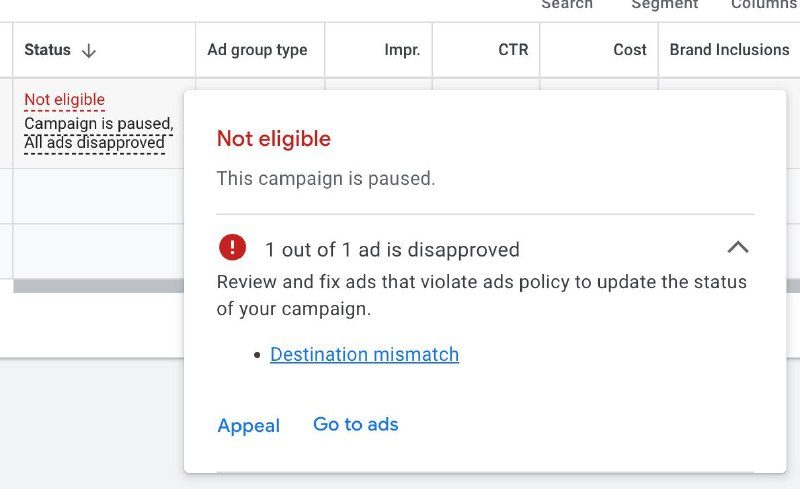
Several accounts running Web2App got a Destination Mismatch error recently. Here is what it means.
A short refresher on how Google Ads works
A campaign has two separate things:
- Final URL — the URL of the store listing.
- Tracking Template — the template with the redirect Google uses to track clicks.
The Final URL and where the Tracking Template redirects to must match. Otherwise Google concludes you are sending the user somewhere other than what you declared, and disapproves the ad.
What happened this time
Most likely the AppsFlyer redirect broke temporarily: the Tracking Template stopped resolving to the Final URL correctly. Google caught the mismatch and switched the ads off.
What to do
- Wait for AppsFlyer to fix it.
- If the launch cannot wait, temporarily remove the tracking template and run traffic directly. The campaign will not track conversions in that state — and, as Zhenya rightly pointed out, this will break campaigns that are already learning.
- Switch to Adjust.
A workaround from the comments
Oleg reports that adding a trailing slash to the Final URL and then writing to support clears it. On support: often there is no real error, but the appeal does not go through on its own — in that case support removes the flag manually. Alexey confirms it: added the slash and it passed, though he had to remove the custom product page. AppsFlyer support also replied that they are aware of the problem and are working with Google on it.